

GS1 QR Code in Java
Encode GS1 application identifiers in a QR Code with FNC1 from Java.
How it works
GS1 QR Code became a ratified GS1 standard in 2012 and is used mainly to share extended packaging information tied to a product’s GTIN. FNC1 acts as a data field separator.
- ~1 marks a GS1 symbol (first position) and ~2 marks an AIM symbol (second position)
- Additional FNC1 characters use ~d029 in byte mode or % in alphanumeric mode, and decode as ASCII 29 (GS)
- For extended packaging information, AI (01) and AI (8200) are mandatory; parentheses are not encoded
- With GS1 emulation, the first FNC1 decodes to ]Q3 for GS1 and ]Q5 for AIM symbols; a standard QR Code decodes to ]Q1
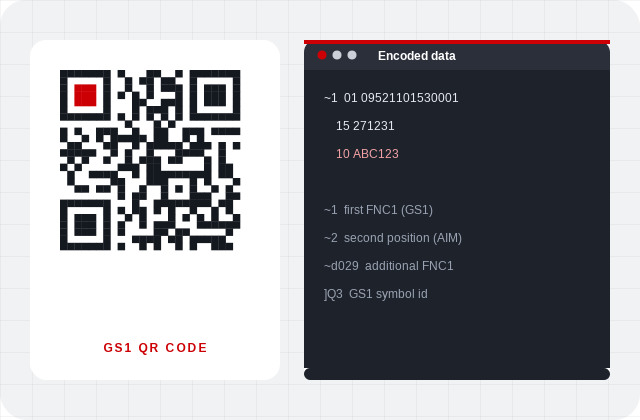
In Java
Illustrative data: enable tilde processing, start with ~1 and separate variable-length element strings with ~d029. See the Java manual for the exact property names for your package.
QRCode qr = new QRCode();
qr.setProcessTilde(true);
qr.setDataToEncode("~1011234567890128~d029" + "1527123110ABC123");
// first FNC1 (~1), then AIs; ~d029 separates variable-length data
Frequently asked questions
Which QR Code packages support GS1?
BarcodeFAQ notes that IDAutomation QR Code products released or updated after April 2016 support GS1 QR Code; GS1 DataMatrix is an alternative for others.
Does the Java package support GS1 QR?
Yes. The Java package lists QR Code, Micro QR and GS1 QR with UTF-8, Auto Mode, ECI, TLV and Swiss QR-Bill.
How do I check the decoded data?
The Barcode Data Decoder Verifier App parses out the AIs.
Related GS1 pages
Learn more at BarcodeFAQ.com
The Internet Barcode FAQ explains GS1 QR Code in depth.