

Spring Boot
Spring Boot Framework Barcode Example
Build a Spring Boot REST API that generates QR Code labels and returns them in a Word document.
A REST API with QR Code labels
The tutorial uses the IDAutomation QR Code JAR and Apache POI in a Spring Boot application.
- Spring Boot 3.4.0 with Maven, Java 17 or 21
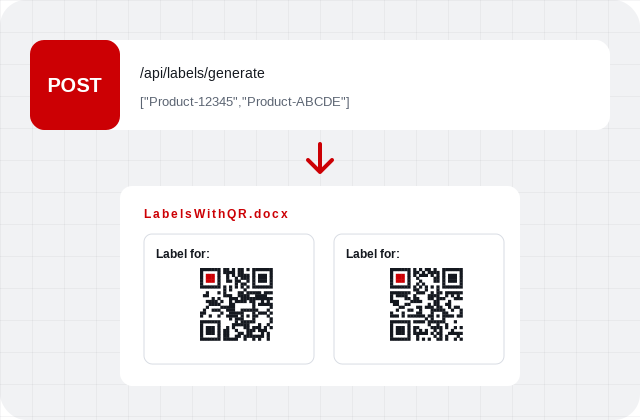
- POST /api/labels/generate takes a JSON array of product IDs
- The response is LabelsWithQR.docx with two labels per row
- QR images are written as temporary JPEG files and deleted after the document is built
Five steps
- Create the projectSelect Spring Boot 3.4.0 with Maven in Spring Initializr, using Java 17 or 21, with the Spring Web and Spring Boot DevTools starters.
- Add Apache POIAdd poi 5.2.3, poi-ooxml 5.2.3, poi-ooxml-schemas 4.1.2 and xmlbeans 5.1.1 to the pom.xml.
- Install the QR Code JARInstall the IDAutomation QR Code JAR locally with mvn install:install-file using groupId com.idautomation, artifactId IDAQRCode and version 1, then reference it with compile scope.
- Write the controllerCreate a @RestController mapped to /api/labels with a POST /api/labels/generate endpoint that accepts a JSON array of product IDs.
- Run and testStart the application (port 8080 by default), POST the JSON array with Content-Type application/json, save the response and open LabelsWithQR.docx in Word.
Install the JAR and call the endpoint
mvn install:install-file -Dfile=IDAQRCode.jar -DgroupId=com.idautomation \
    -DartifactId=IDAQRCode -Dversion=1 -Dpackaging=jar

POST http://localhost:8080/api/labels/generate
Content-Type: application/json

["Product-12345", "Product-ABCDE"]
Frequently asked questions
What does the Spring Boot tutorial build?
A REST API that generates QR Code labels and inserts them into Word (.docx) files using the IDAutomation Java Barcode QR Code JAR and Apache POI.
What does the endpoint return?
A binary stream returned as an attachment named LabelsWithQR.docx, or HTTP 500 on failure. Each row holds two labels with the product ID and a 70x70 QR Code image.
Can I use other barcodes?
Yes. The tutorial notes that UPC, EAN, GS1, PDF417, Data Matrix and Code 128 can be added with a similar process.
Try it in Spring Boot
Follow the complete tutorial at IDAutomation.