

Java Barcode Servlet and Encoding Options
Stream barcodes from Tomcat and other servers, and control encoding with the properties and tilde options in the Java user manual.
Barcodes from a URL
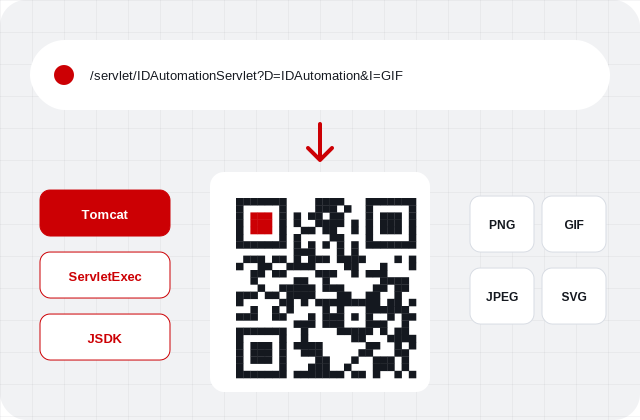
Each JAR has a servlet class that must be mapped to a URL. Parameters are passed in the query string, and the barcode is embedded with an img tag. The default resolution is 96 DPI.
- Image formats GIF, JPEG, PNG and SVG, with GIF files typically much smaller than JPEG
- Deployment tutorials for Apache Tomcat, the Java Servlet SDK (jsdk2.1) and ServletExec on Windows Server
- Headless operation and java.awt BufferedImage drawing for server-side code
Servlet parameters
Codes use Y or N for true and false. A Data Matrix preferred format is given as C plus a size, such as C16X48.
| Parameter | Purpose |
|---|---|
| D | Data to encode |
| S | Symbology (text name; a number in JavaBeans) |
| I | Image format |
| W / H | Image size (setting these disables auto-sizing) |
| X | X dimension |
| N | Narrow-to-wide ratio |
| ST / TA | Show text and text location |
| FC / BC / BGC | Text, bar and background colors |
| IR | Resolution (PixelsPerCM) |
| LM / TM / EM | Left, top and text margins |
| O | Rotation angle |
| PT | Process tilde |
| CC / CT / CG | Check character, check character in text, character grouping |
Class properties
Keep the defaults unless a change is needed.
| Group | Class properties |
|---|---|
| Common | AutoSize, Background, Foreground, DataToEncode, Image, ImageSize, LeftMarginCM, TopMarginCM, PixelsPerCM, ProcessTilde, RotationAngle, XDimensionCM |
| Linear | BarHeightCM, Code128Set, CheckCharacter, CheckCharacterInText, NarrowToWideRatio, ShowText, ShowTextLocation, SymbologyID, WhiteBarIncrease |
| QR Code | EncodingMode (Auto, Byte, Alpha, Num), ErrorCorrectionLevel (L, M, Q, H), Version (1 to 40; 0 for automatic) |
| Data Matrix ECC200 | EncodingMode (-1 Auto, 0 ASCII, 1 C40, 2 Text, 3 Base256), MarginCM, PreferredFormat, ProcessTilde, ShowText, SingleLineHR |
| PDF417 | PDFColumns, PDFErrorCorrection (0 to 8), PDFMode (Binary, Text, Numeric), Truncated, XtoYRatio, macroPDF settings |
| Aztec and MaxiCode | Aztec ErrorCorrectionLevel (1 to 99; 0 for automatic), MessageAppend, NumberOfSymbols; MaxiCode Mode (2 to 6), Country, ServiceClass, ZipCode |
Encoding options
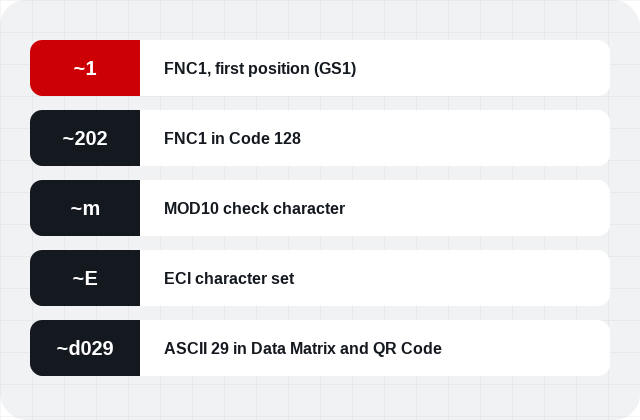
Special characters are entered with tilde codes when tilde processing is enabled.
- FNC1: ~202 in Code 128, or ~1 in GS1 DataMatrix and GS1 QR Code; parenthesized AIs also work in Code 128
- Check characters: ~m MOD10 (GS1), ~f MOD43 (HIBC), ~i MOD37-2 (ISBT), with the digits before the tilde included
- ASCII values: ~??? in Code 128, or ~d??? in Data Matrix and QR Code; ECI with ~E
- QR Code 2022 and later: built-in TLV and Base64 with ProcessTilde, and Center Override for Swiss QR-Bill images
Frequently asked questions
How do I install the JAR?
Install Java, copy the package JAR (for example LinearBarCode.jar) to a directory, and add the JAR and a period to CLASSPATH. Run CreateJPEG or run.bat and enter IDAUTOMATION to test.
What if there is no GUI?
If java.awt is missing or no GUI is available, use headless Java, a remote X server, an X Windows session or a virtual frame buffer.
How do I use the servlet?
Map the servlet class in the web configuration, for example com.idautomation.qrcode.IDAutomationServlet, then request it by URL with query string parameters and embed the result with an HTML img tag.
How do I improve performance?
Auto-sizing creates a temporary image to measure the barcode. Specify the width and height and set AutoSize to false.
Is the servlet secure?
For secure servlets, modify the servlet source to prevent end-user manipulation and consider SSL hosting.
Read the Java user manual
Installation, examples, servlet and properties in one place.