

Java Font Encoder with Barcode Fonts
Format data for IDAutomation barcode fonts with the Java Barcode Font Encoder Class Library.
Encode, then apply the font
The class library formats your data. When the barcode font is applied to the returned text, an accurate barcode is displayed.
- Code 128 (Code128 recommended, plus Code128a, b and c) with the IDAutomationC128 font
- Code 39 and Code39Mod43, Code 93, I2of5 and I2of5Mod10, EAN13, EAN8, UPCa and UPCe
- IntelligentMail, the Universal Barcode Font Advantage (IDAutomation_Universal_ methods) and GS1 DataBar (IDAutomation_DataBar_ methods)
- Parameters: ApplyTilde, DataToEncode, N_Dimension (2, 2.5 or 3) and IncludeCheckDigit
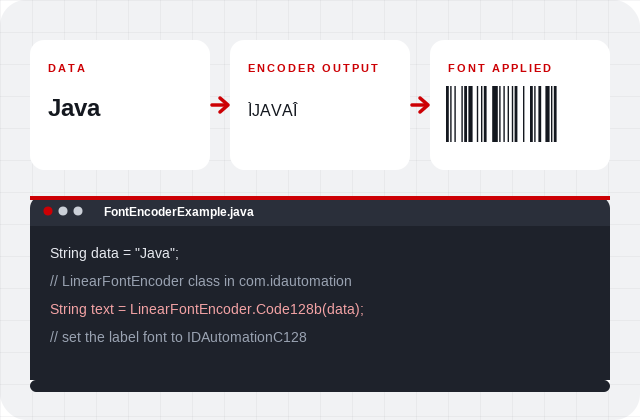
A Code 128 example
Examples are provided for Code 128, DataBar Stacked Omnidirectional, the Universal font with ApplyTilde, and IntelligentMail.
String text = LinearFontEncoder.Code128b("Java");
// show text in a label or document and set the font to IDAutomationC128
Setup
- Create the directoryCreate the directory com\idautomation at the root of the classpath.
- Add the classAdd LinearFontEncoder.class to that directory.
- Call the methodsCall the class methods to format the data for the appropriate font.
- Apply the fontInstall the barcode font and set it on the control that shows the returned text.
Barcode fonts
Self-checking fonts such as Code 39, Codabar and Industrial 2 of 5 need no check digit calculation. High-density fonts need check characters calculated, which the encoder does.
- Code 39 (opens in a new tab)
- Codabar (opens in a new tab)
- Industrial 2 of 5 (opens in a new tab)
- Code 128 (opens in a new tab)
- Interleaved 2 of 5 (opens in a new tab)
- UPC / EAN (opens in a new tab)
- PDF417 (opens in a new tab)
- Data Matrix (opens in a new tab)
- Aztec (opens in a new tab)
- QR Code (opens in a new tab)
- MaxiCode (opens in a new tab)
- MICR (opens in a new tab)
- OCR-A and OCR-B (opens in a new tab)
Frequently asked questions
What does the Java font encoder do?
It formats data for barcode fonts before printing. It is royalty-free with the purchase of a Developer License to one of IDAutomation’s barcode fonts.
How do I install it?
Create the directory com\idautomation at the root of the classpath, add LinearFontEncoder.class to it, then call the class methods to format the data for the font.
What does the demo do?
The demo class shows a popup and is for testing only. After purchase, replace it with the licensed version.
What about 2D fonts?
2D symbologies are supported through separate packages, each with its own libraries, examples and JavaDoc in a Developer Tools zip file.
What about Oracle EBS and XML Publisher?
Those users are directed to an Oracle BIP tutorial on the font encoder page at IDAutomation.
Print barcodes from Java with fonts
A Developer License of any barcode font includes the encoder.